Just Enter the Dimensions — Let the Software Do the Rest
The client calls: "Let's take ten centimetres off that cabinet." That sentence used to mean reworking the drawing, rewriting the cut list and recalculating the quote — and worst of all, one of those three usually stayed out of date.
In Cabinet Wizard the size lives in one place. You type it; the software does the rest.
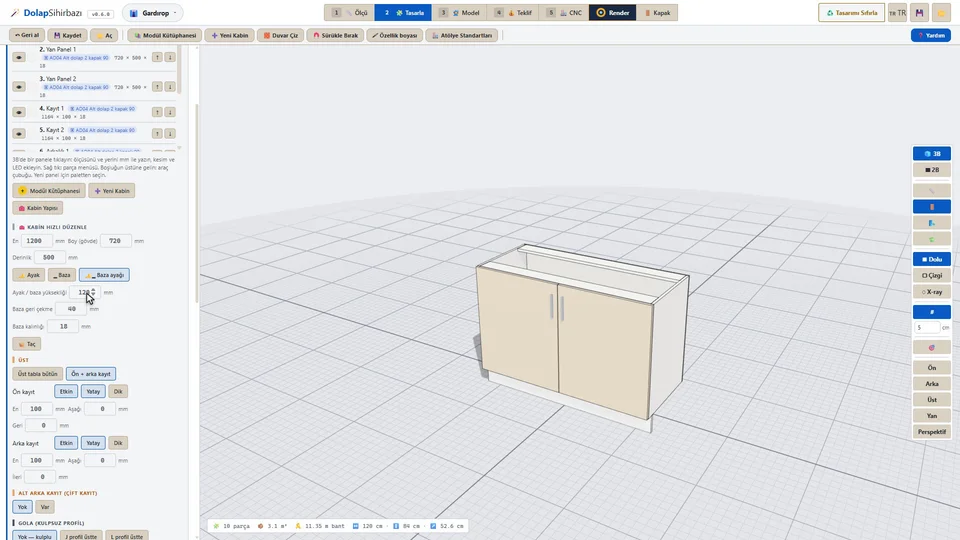
One card for the whole cabinet
- Size: width, carcass height, depth, height off the floor.
- Bottom: feet, plinth, or plinth with feet.
- Top: a full top panel, or front and back rails.
- Lower back rail: double rail on or off.
- Gola: the handleless profile — with a handle, or a J profile on top.
What is recalculated when one number changes
- Cut sizes of every panel (finished size and cut size sit side by side on the card).
- Shelf, divider and drawer layout.
- Holes: hinge cups and plates, shelf pins, cam locks, dowels, handle screws.
- Hinge count — derived from the door height, overridable from the right-click menu.
- Edge-banding metres, as you switch each of the four edges on or off.
- Sheet nesting, usage percentage and the CNC program.
- The quote — material, hardware, labour, margin and VAT, line by line.
The live counter at the bottom of the screen makes this visible: part count, square metres of board and metres of banding update on every change.
The software also pushes back
"Enter the size and let it handle the rest" does not mean accepting every number in silence. Before anything reaches production you get warnings such as:
- "Door 2147 × 597 mm: heavy door, 5 hinges or a 22 mm door is advised."
- "Side 2132 mm, back 8 mm: add a middle rail or use a thicker back on a tall carcass."
If the issue is serious, a production block appears at the CNC step and no output is produced until you acknowledge it.
When the client changes their mind
This is the best part: after a change you do not recut the job. You cut only the parts that actually changed, and the quote is already waiting with its new total.
Frequently asked
Do I type sizes on the panel or on the cabinet?
Either. The cabinet card changes the whole unit; click a single panel and its own card opens with height, width, thickness, position, edge allowance, banding, connector direction, cut-outs and pockets.
Do my manual edits survive a size change?
Panels you edited or removed by hand are kept in their own lists, so the software knows what you changed. If something goes wrong, ↶ and Ctrl+Z undo it in one step.
Can I see the difference between finished size and cut size?
Yes, they sit side by side at the top of the card — for example a 2147 × 597 door with a cut size of 2143 × 593 mm.
Every feature, the lesson series and the trial version are on the product page: Cabinet Wizard — Best SketchUp Plugins.